
This article is to document how to locate PLU/POS ID in Micros Integration Platform.
Method 1
Instructions
In Micros, navigate to the selected Item’s page and select ‘General’ in the tabs. There is a ‘Number’ Field and a ‘Def Sequence’ dropdown list (See photo below for reference). These values represent:
|
Number |
PLU ID |
Example: If Number = 4002012, then PLU = 4002012 |
|---|---|---|
|
Def Sequence # |
Identification values after the PLU ID Note* there is always a dash “-” right after the PLU with no spaces. |
Example: then PLU = 4002012-1 |

Method 2
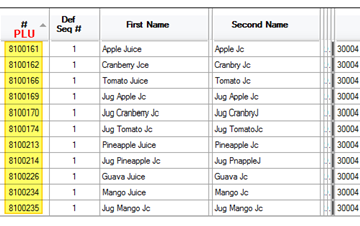
The first part is the PLU - shown in column 1 here - the second part is the definition - shown in the second column here. So for Apple Juice it would be 8100161-1 is what is entered into the Tapendium CMS
Comments
0 comments
Please sign in to leave a comment.