
Order Fails
Sometimes orders will not progress. There are multiple reasons for this.
When an order fails this will be shown in the Tapendium Order Viewer as a Failed (superadmin) order.
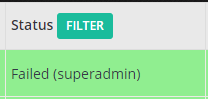
This Order needs to be manually processed into the POS so the guest can receive their order.
Investigating The Order
A user should check the error code of the order. To do this you open the order and click on “Log”.
The Log will show you the error message

To confirm the reason for this error please see the appropriate Support Page for your POS.
Go to Point of Sale(POS) Integrations to find your POS and it's associated error codes
This will confirm the error codes that are known and the resolution if known.
Error Code Not Found
If an error code is not found on your relevant POS then the first step is to read the error code. It may sound silly but a lot of the time the root cause can be identified in the message received back by the system.
If you cannot identify the root cause please feel free to raise a query with support@tapendium.com
Comments
0 comments
Please sign in to leave a comment.